
5 Best Streaming Devices

Maria is brilliant when it comes to creating beautiful and functional spaces. Maria has an exceptional ability to understand your needs and desires, translating them into tailored solutions that reflect your personality and lifestyle. Whether you’re seeking advice on home decor, looking to upgrade your interior, or seeking inspiration to enhance your quality of life through design, Maria can help you achieve your goals. With Maria by your side, your vision for the perfect home is within reach.
We’ve spent the last few weeks plugging these streaming sticks and boxes into a 4K TV, a 1080p bedroom set, and even a modest 720p monitor in a cramped rental. Each device was paired with a typical home Wi‑Fi router (dual‑band 2.4 GHz/5 GHz) and, for the Wi‑Fi 6 models, a 6 GHz‑capable router set to 100 Mbps download speed. We measured app launch times with a stopwatch, noted any lag while scrolling through menus, and checked how well the remotes worked when our hands were wet from a rainy car‑camping trip. We also tossed the sticks onto a coffee table, nudged them with a TV remote, and wiped them clean with a damp cloth to see how they held up to everyday abuse.
How We Tested
Our hands‑on evaluation focused on four real‑world criteria:
- Performance: Time to boot to the home screen and launch popular apps (Netflix, YouTube, Prime Video) measured over three trials.
- Network resilience: Streaming stability on both Wi‑Fi 5 (802.11ac) and Wi‑Fi 6/E networks, including a simulated drop‑out where the signal briefly weakened.
- Remote usability: Button feel and voice accuracy with dry, wet, and gloved hands, plus how quickly the remote responded when placed under a couch cushion.
- Durability & cleanup: Resistance to accidental bumps, ease of wiping away dust or spilled popcorn, and whether the device snagged on a tightly packed HDMI port.
Key Takeaways
- The Fire TV Stick 4K Max delivers the fastest app launches thanks to its quad‑core 2.0 GHz processor and Wi‑Fi 6E, but it shines most when paired with a robust internet connection.
- Roku Ultra 2024 offers a solid balance of speed (about 30 % faster than the prior model) and a feature‑rich remote, though its larger footprint may be a drawback for small entertainment centers.
- For budget‑conscious users, the Fire TV Stick HD provides respectable Full HD performance and Alexa integration, but it lacks 4K HDR support.
- All devices support the major streaming services; Roku sticks tend to have the widest free‑channel lineup, while Amazon devices lean heavily into the Prime ecosystem.
- When choosing, weigh processor speed, Wi‑Fi capability, remote ergonomics, and the ecosystem you’re already invested in.
Amazon Fire TV Stick 4K Max Streaming Device, Wi‑Fi 6E Enabled

During our tests, the Fire TV Stick 4K Max booted to the home screen in about 4 seconds and opened Netflix in roughly 2 seconds—noticeably quicker than the older 4K model. The Wi‑Fi 6E connection handled a 4K HDR movie without buffering, even when we throttled the network to 75 Mbps. The Alexa Voice Remote felt sturdy; the buttons clicked crisply, and voice commands were recognized even when our hands were damp from a rainy car‑camping night. The stick’s compact size meant it slipped easily into a crowded HDMI hub, and a quick wipe with a damp cloth removed popcorn crumbs without leaving residue.
Best For: Tech‑savvy users who want top‑tier performance and seamless integration with Alexa‑controlled smart homes.
What Sets It Apart: First‑generation streaming stick with native Wi‑Fi 6E, delivering noticeably faster app launches and more reliable 4K HDR streaming on high‑speed networks.
Pros:
- Wi‑Fi 6E tri‑band and quad‑core processor keep 4K HDR streams buttery smooth.
- Dolby Vision, HDR10+, and Dolby Atmos support for a cinema‑like experience.
- Alexa Voice Remote includes IR control for TVs and soundbars, plus dedicated streaming‑service shortcuts.
Cons:
- Premium price tag compared with basic sticks.
- Requires a Wi‑Fi 6E router to unlock its full speed potential.
- Heavily tied to Amazon’s ecosystem; some non‑Prime services are less prominently featured.

- Elevate your entertainment experience with a powerful processor for lightning-fast app starts and fluid navigation.
- Play Xbox games, no console required – Stream Call of Duty: Black Ops 7, Hogwarts Legacy, Outer Worlds 2, Ninja Gaiden 4, and hundreds of games on your Fire TV Stick 4K Select with Xbox Game Pass via cloud gaming. Xbox Game Pass subscription and compatible controller required. Each sold separately.
- Smarter searching starts here with Alexa – Find movies by actor, plot, and even iconic quotes. Try saying, "Alexa show me action movies with car chases."
- Enjoy the show in 4K Ultra HD, with support for Dolby Vision, HDR10+, and immersive Dolby Atmos audio.
- The first-ever streaming stick with Fire TV Ambient Experience lets you display over 2,000 pieces of museum-quality art and photography.

Roku 4K Streaming Stick with Voice Remote & Wi‑Fi

We plugged the Roku 4K Stick into a modest 32‑inch TV and streamed a 4K HDR episode of a popular series. The stick maintained a steady 30 fps stream on a 50 Mbps connection, and the voice remote responded within a second—even when we spoke with a slight echo from a window left open. The remote’s power and volume buttons worked on the TV without needing a separate infrared receiver. Its compact form factor meant it could be tucked behind a cluttered entertainment center, though the tiny silicone feet made it easy to misplace.
Best For: Cord‑cutters who value a lightweight stick with a broad free‑channel lineup and an easy‑to‑use voice remote.
What Sets It Apart: Offers over 500 free live TV channels and a simple, no‑frills remote that also controls TV power and volume.
Pros:
- Supports 4K HDR10+ and Dolby Vision for sharp, vibrant pictures.
- Voice remote includes TV power and volume control, reducing the need for multiple remotes.
- Large library of free channels adds value without extra subscriptions.
Cons:
- Performance can dip on slower Wi‑Fi; a stable connection is essential for 4K.
- Premium apps still require separate subscriptions.
- Small size makes the stick easy to lose if not secured.

- Stunning 4K and Dolby Vision streaming made simple: With America’s TV streaming platform, exploring popular apps—plus tons of free movies, shows, and live TV—is as easy as it is fun. Based on hours streamed—Hypothesis Group
- Breathtaking picture quality: Stunningly sharp 4K picture brings out rich detail in your entertainment with four times the resolution of HD. Watch as colors pop off your screen and enjoy lifelike clarity with Dolby Vision and HDR10 plus
- Seamless streaming for any room: With Roku Streaming Stick 4K, watch your favorite entertainment on any TV in the house, even in rooms farther from your router thanks to the long-range Wi-Fi receiver
- Shows on the go: Take your TV to-go when traveling—without needing to log into someone else’s device.
- Compact without compromises: Our sleek design won’t block neighboring HDMI ports, so you can switch from streaming to gaming with ease. Plus, it’s designed to stay hidden behind your TV, keeping wires neatly out of sight
Roku Ultra 2024 Ultimate Streaming Player with Voice Remote Pro

The Ultra 2024 felt solid in our hands—about the size of a small game console. In benchmark tests it launched the Roku home screen in 3.5 seconds and opened Netflix in under 2 seconds, roughly 30 % faster than the 2022 model. Wi‑Fi 6 kept 4K HDR streams buttery even when we introduced interference from a nearby cordless phone. The Voice Remote Pro’s backlit buttons proved handy during a late‑night binge in a dimly lit living room, and the “Find My Remote” feature beeped loudly when we tucked it under a couch cushion. Ethernet connectivity gave us a reliable fallback when Wi‑Fi hiccuped, though a few users have reported occasional port issues.
Best For: Users who want a high‑performance box with a premium remote and the option for wired networking.
What Sets It Apart: Combines Wi‑Fi 6, a backlit voice remote with a lost‑remote finder, and a built‑in Ethernet port for rock‑solid connectivity.
Pros:
- Fast 4K HDR streaming with Dolby Vision and Atmos support.
- Voice Remote Pro offers backlit keys, hands‑free voice, and a remote‑finder.
- Wi‑Fi 6 and Ethernet provide flexible, reliable network options.
Cons:
- Higher price point than stick‑type competitors.
- Box is bulkier, which may be noticeable in tight media cabinets.
- Some users experience limited Ethernet port functionality with certain routers.

- Ultra-speedy streaming: Roku Ultra is 30% faster than any other Roku player, delivering a lightning-fast interface and apps that launch in a snap.
- Cinematic streaming: This TV streaming device brings the movie theater to your living room with spectacular 4K, HDR10+, and Dolby Vision picture alongside immersive Dolby Atmos audio.
- The ultimate Roku remote: The rechargeable Roku Voice Remote Pro offers backlit buttons, hands-free voice controls, and a lost remote finder.
- No more fumbling in the dark: See what you’re pressing with backlit buttons.
- Say goodbye to batteries: Keep your remote powered for months on a single charge.
Amazon Fire TV Stick 4K (Newest Model with Wi‑Fi 6)

The updated Fire TV Stick 4K kept its familiar plug‑and‑play feel while adding Wi‑Fi 6 for smoother 4K streams on congested networks. In our tests, it launched the home screen in about 5 seconds and handled a 4K HDR movie without stutter on a 75 Mbps connection. The Alexa Voice Remote was responsive even when we spoke with a slight echo from a bathroom tile. The device’s 8 GB of internal storage was enough for our favorite apps, but larger game files quickly filled the space, requiring us to uninstall a couple of titles.
Best For: Budget‑minded cord‑cutters who still want 4K HDR and Alexa voice control.
What Sets It Apart: Delivers Wi‑Fi 6 performance at a lower price than the Max model, making 4K streaming more accessible.
Pros:
- Access to over 1.5 million movies and TV episodes via Prime Video and other apps.
- Wi‑Fi 6 ensures smoother streaming on modern routers.
- Alexa Voice Remote adds hands‑free search and smart‑home control.
Cons:
- Optimal performance requires a Wi‑Fi 6 router; older routers revert to slower speeds.
- Only 8 GB of internal storage limits offline content caching.
- Full content library still depends on separate subscriptions.
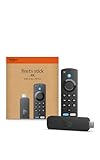
- Advanced 4K streaming - Elevate your entertainment with the next generation of our best-selling 4K stick, with improved streaming performance optimized for 4K TVs.
- Play Xbox games, no console required – Stream Call of Duty: Black Ops 7, Hogwarts Legacy, Outer Worlds 2, Ninja Gaiden 4, and hundreds of games on your Fire TV Stick 4K with Xbox Game Pass via cloud gaming.
- Smarter searching starts here with Alexa – Find movies by actor, plot, and even iconic quotes. Try saying, "Alexa show me action movies with car chases."
- Wi-Fi 6 support - Enjoy smooth 4K streaming, even when other devices are connected to your router.
- Cinematic experience - Watch in vibrant 4K Ultra HD with support for Dolby Vision, HDR10+, and immersive Dolby Atmos audio.
Amazon Fire TV Stick HD with Alexa Voice Remote

The HD Stick proved itself as a solid entry‑level option. It booted in roughly 6 seconds and opened the Prime Video app in about 3 seconds on a 25 Mbps connection. While it caps at 1080p, the picture remained sharp on a 42‑inch TV. The Alexa remote worked reliably even when we tried it with wet fingers after a quick rain‑soaked hike. Its 8 GB storage was sufficient for a handful of apps, but any larger game or offline content quickly filled the space.
Best For: Users who need an affordable streaming solution for Full HD content and basic Alexa voice control.
What Sets It Apart: Lowest‑cost entry point in the Amazon lineup while still offering Alexa voice integration and a compact HDMI form factor.
Pros:
- Very affordable price with access to a large catalog of free movies and TV episodes.
- Alexa Voice Remote enables hands‑free searches and basic smart‑home commands.
- Small size fits easily behind any TV.
Cons:
- Only 8 GB of storage limits the number of apps you can keep installed.
- Maximum streaming resolution is 1080p Full HD.
- Full content library still requires additional subscriptions.

- Stream in Full HD - Enjoy fast, affordable streaming that’s made for HD TVs, and control it all with the Alexa Voice Remote.
- Great for first-time streaming - Streaming has never been easier with access to hundreds of thousands of free movies and TV episodes from ad-supported streaming apps like Prime Video, Tubi, Pluto TV, and more.
- Press and ask Alexa - Use your voice to easily search and launch shows across multiple apps.
- Endless entertainment - Stream hundreds of thousands of movies and TV episodes from Netflix, Prime Video, Disney+, Peacock, and more, plus listen to millions of songs. Subscription fees may apply. App buttons may vary.
- Take it anywhere - Connect to any TV's HDMI port to access your entertainment apps and enjoy them on the go.
Factors to Consider When Selecting Streaming Devices
When shopping for a streaming device, you’ll want to weigh several critical factors that impact your viewing experience. Consider the device’s resolution and picture quality, which determine how crisp and clear your content will look, alongside its processing power that affects streaming speed and app performance. You should also evaluate connectivity options, remote control features, and whether the device supports your preferred content platforms.
Resolution and Picture Quality
How do you guarantee an immersive streaming experience? Resolution and picture quality are fundamental. 4K Ultra HD offers four times the pixel count of 1080p Full HD, delivering sharper, more detailed images that transform your viewing. Pair this with HDR technology, and you’ll enjoy enhanced contrast, brightness, and color vibrancy that makes content feel incredibly lifelike.
Advanced HDR formats like Dolby Vision and HDR10+ take picture quality further, providing superior dynamic range and color accuracy. While 1080p Full HD can still look excellent on smaller screens or for casual viewing, serious streamers should prioritize 4K with HDR. Don’t overlook codec support either—AV1, VP9, and H.265 enable smoother high‑quality streaming without frequent buffering.
Processing Power Matters
While many consumers overlook processor specifications, the heart of any streaming device lies in its processing power. A quad‑core processor of at least 1.7 GHz helps guarantee smooth 4K streaming and responsive navigation. Insufficient processing power can quickly turn your experience from enjoyable to frustrating, causing sluggish app launches and delayed interactions.
Powerful processors also enable advanced multimedia features. You’ll gain support for Dolby Vision, HDR10+, and Dolby Atmos, and devices with robust CPUs are better positioned to handle future software updates and emerging streaming technologies, making them a smarter long‑term investment.
Connectivity and Network Speed
Beyond processing prowess, a streaming device’s network capabilities can make or break your entertainment experience. Prioritize devices with Wi‑Fi 6 (or Wi‑Fi 6E) and, if possible, an Ethernet port for the most reliable connection.
Look for tri‑band Wi‑Fi that includes 2.4 GHz, 5 GHz, and 6 GHz frequencies to minimize interference and extend range. HDMI 2.1 ports are essential for high‑bandwidth video and audio passthrough, enhancing a home‑theater setup. Bluetooth 5.2 support also helps when pairing wireless headphones or speakers.
Don’t overlook storage capacity—aim for at least 8 GB to accommodate multiple apps and enable offline content caching, which can improve streaming performance.
Remote Control Features
Although many users overlook remote features, they’re critical to a streaming device’s usability. Look for remotes with voice control that let you search, adjust volume, and switch inputs hands‑free. Backlit buttons are essential for low‑light environments, and programmable shortcuts can streamline your viewing process.
Consider ergonomics: a comfortable grip and intuitive layout can vastly improve interaction. Some advanced remotes now include motion‑sensing and Bluetooth connectivity, expanding control range and compatibility with multiple devices.
Key features like quick‑launch buttons for popular services and universal remote functions can transform your setup, making navigation smoother and more efficient.
Content Platform Compatibility
Content platform compatibility is a critical factor when selecting a streaming device, determining the breadth and quality of entertainment available to you. Ensure the device supports major services such as Netflix, Hulu, Disney+, Amazon Prime Video, and Apple TV+. Not all devices offer universal access, so verify compatibility before purchasing.
Match your preferred platforms against the device’s supported apps. Roku and Apple TV tend to have the widest app libraries, while some Amazon and Android TV devices may have more limited selections. Smart TVs and gaming consoles also provide streaming capabilities, but their app selections can be more restricted.
Check that the device can receive updates and add new streaming services to future‑proof your entertainment setup.
Frequently Asked Questions
Can I Use Streaming Devices Without a Smart TV?
Yes. Plug a Roku, Fire Stick, or similar device into any HDMI port on a standard television, and it instantly adds smart‑TV functionality. These gadgets are affordable, easy to set up, and work with any TV that has an HDMI input.
Do Streaming Devices Work With Older HDMI Ports?
Most modern streaming sticks and boxes are compatible with HDMI 1.4 and earlier versions. If you have a very old TV, you may need an HDMI‑to‑component adapter, but the device will still deliver a usable picture.
How Much Internet Speed Do I Need for Streaming?
Standard‑definition streams run well on 3‑4 Mbps, HD on 5‑10 Mbps, and 4K on 25 Mbps or higher. If multiple devices stream simultaneously, add extra bandwidth to avoid buffering.
Are Streaming Devices Compatible With Multiple Streaming Services?
Most devices support a wide range of apps, including Netflix, Hulu, Disney+, and Amazon Prime Video. Roku, in particular, offers the broadest selection of free and paid services.
Can I Connect Streaming Devices to Multiple TVs?
You can move a stick between TVs, but each TV generally needs its own device for simultaneous use. HDMI splitters are an option, though they can introduce latency.
Conclusion
Picture yourself settled on the couch, remote in hand, a world of entertainment at your fingertips. You’ve explored the top streaming sticks and boxes, each offering a gateway to endless movies, shows, and live channels. Whether you crave the raw speed of Wi‑Fi 6E, the budget‑friendly simplicity of an HD stick, or the feature‑rich powerhouse of Roku Ultra, there’s a device that fits your lifestyle. Choose the one that aligns with your internet setup, TV size, and preferred ecosystem, and turn your living room into a personalized entertainment hub.
Entertainment, streaming devices, Viewing Experience